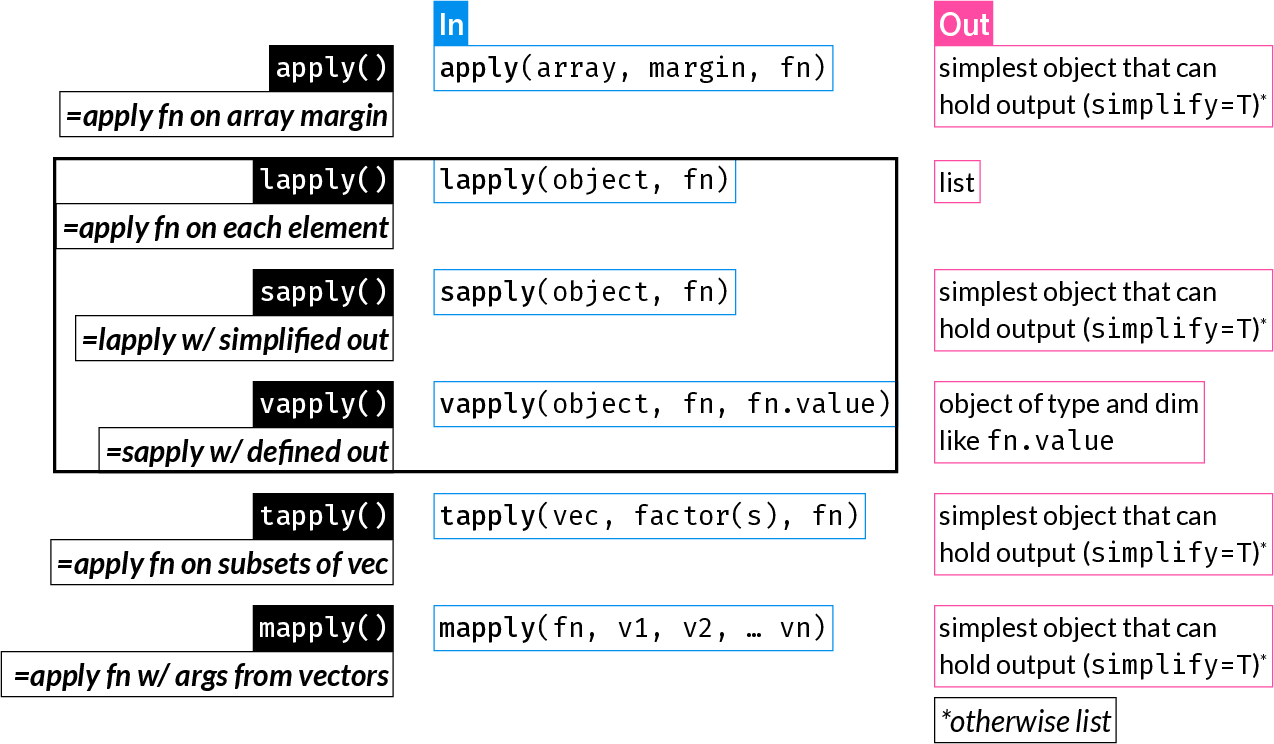
*apply() function family summary (Best to read through this chapter first and then refer back to this figure)
The apply functions are some of the most widely used R functions. They replace longer expressions created with a for loop, for example.
They can result in more compact and readable code.
| Function | Description |
|---|---|
apply() |
Apply function over array margins (i.e. over one or more dimensions) |
lapply() |
Return a list where each element is the result of applying a function to each element of the input |
sapply() |
Same as lapply(), but returns the simplest possible R object (instead of always returning a list) |
vapply() |
Same as sapply(), but with a pre-specified return type: this is safer and may also be faster |
tapply() |
Apply a function to elements of groups defined by a factor |
mapply() |
Multivariate sapply(): Apply a function using the 1st elements of the inputs vectors, then using the 2nd, 3rd, etc. |
*apply() function family summary (Best to read through this chapter first and then refer back to this figure)
apply()
apply() applies a function over one or more dimensions of an array of 2 dimensions or more (this includes matrices) or a data frame:
apply(array, MARGIN, FUN)
MARGIN can be an integer vector or character indicating the dimensions over which ‘FUN’ will be applied.
By convention, rows come first (just like in indexing), therefore:
MARGIN = 1: apply function on each row
MARGIN = 2: apply function on each column
Let’s create an example dataset:
       Age   Weight   Height      SBP
1 43.04683 88.39399 1.997574 130.4103
2 49.57454 71.96964 1.650555 140.8885
3 31.30313 70.66039 1.565257 137.9898
4 38.19285 88.84806 1.665488 135.3079
5 46.71437 88.67120 1.975969 134.5037
6 33.01632 80.05601 1.467901 129.0368
Let’s calculate the mean value of each column:
dat_column_mean <- apply(dat, MARGIN = 2, FUN = mean)
dat_column_mean
Age Weight Height SBP
41.170074 79.202672 1.723275 134.927922 Hint: It is possibly easiest to think of the “MARGIN” as the dimension you want to keep.
In the above case, we want the mean for each variable, i.e. we want to keep columns and collapse rows.
Purely as an example to understand what apply() does, here is the equivalent procedure using a for-loop. You notice how much more code is needed, and why apply() and similar functions might be very convenient for many different tasks.
       Age     Weight     Height        SBP
41.170074 79.202672 1.723275 134.927922 Let’s create a different example dataset, where we record weight at multiple timepoints:
dat2 <- data.frame(ID = seq(8001, 8020),
                   Weight_week_1 = rnorm(20, mean = 110, sd = 10))
dat2[["Weight_week_3"]] <- dat2[["Weight_week_1"]] + rnorm(20, mean = -2, sd = 1)
dat2[["Weight_week_5"]] <- dat2[["Weight_week_3"]] + rnorm(20, mean = -3, sd = 1.1)
dat2[["Weight_week_7"]] <- dat2[["Weight_week_5"]] + rnorm(20, mean = -1.8, sd = 1.3)
dat2
ID Weight_week_1 Weight_week_3 Weight_week_5 Weight_week_7
1 8001 110.75962 110.33945 107.57846 107.43932
2 8002 120.08294 118.23047 116.18781 114.85505
3 8003 112.32755 110.20553 107.34706 103.54524
4 8004 115.93066 114.38573 112.56979 108.88211
5 8005 115.93470 112.44607 110.09676 107.64473
6 8006 112.91943 110.12586 108.07086 104.60309
7 8007 118.35470 115.77990 111.50384 110.01303
8 8008 90.52875 87.33806 82.58269 79.94780
9 8009 125.00890 121.98684 118.53471 118.39271
10 8010 112.96525 111.56389 108.79037 107.23665
11 8011 115.17919 112.29805 110.54783 108.74450
12 8012 117.51618 118.11684 116.06572 113.73570
13 8013 92.62306 92.18223 89.83251 88.14840
14 8014 120.89414 119.60669 118.14870 116.90171
15 8015 115.23257 112.19577 110.28947 104.07303
16 8016 119.61346 117.09601 114.92162 113.45808
17 8017 107.91502 104.62236 100.89801 98.84418
18 8018 136.84850 134.23550 132.96475 133.40244
19 8019 105.28348 103.36195 98.03358 95.94898
20 8020 81.81441 78.37959 74.93870 73.99013Let’s get the mean weight per week:
apply(dat2[, -1], 2, mean)Weight_week_1 Weight_week_3 Weight_week_5 Weight_week_7
112.3866 110.2248 107.4952 105.4903 Let’s get the mean weight per individual across all weeks:
apply(dat2[, -1], 1, mean) [1] 109.02921 117.33907 108.35635 112.94207 111.53056 108.92981 113.91287
[8] 85.09932 120.98079 110.13904 111.69239 116.35861 90.69655 118.88781
[15] 110.44771 116.27229 103.06989 134.36280 100.65700 77.28071apply() converts 2-dimensional objects to matrices before applying the function. Therefore, if applied on a data.frame with mixed data types, it will be coerced to a character matrix.
This is explained in the apply() documentation under “Details”:
“If X is not an array but an object of a class with a non-null dim value (such as a data frame), apply attempts to coerce it to an array via as.matrix if it is two-dimensional (e.g., a data frame) or via as.array.”
Because of the above, see what happens when you use apply on the iris data.frame which contains 4 numeric variables and one factor:
str(iris)'data.frame': 150 obs. of 5 variables:
$ Sepal.Length: num 5.1 4.9 4.7 4.6 5 5.4 4.6 5 4.4 4.9 ...
$ Sepal.Width : num 3.5 3 3.2 3.1 3.6 3.9 3.4 3.4 2.9 3.1 ...
$ Petal.Length: num 1.4 1.4 1.3 1.5 1.4 1.7 1.4 1.5 1.4 1.5 ...
$ Petal.Width : num 0.2 0.2 0.2 0.2 0.2 0.4 0.3 0.2 0.2 0.1 ...
$ Species : Factor w/ 3 levels "setosa","versicolor",..: 1 1 1 1 1 1 1 1 1 1 ...apply(iris, 2, class)Sepal.Length Sepal.Width Petal.Length Petal.Width Species
"character" "character" "character" "character" "character" lapply()
lapply() applies a function on each element of its input and returns a list of the outputs.
Note: The ‘elements’ of a data frame are its columns (remember, a data frame is a list with equal-length elements). The ‘elements’ of a matrix are each cell one by one, by column. Therefore, unlike apply(), lapply() has a very different effect on a data frame and a matrix. lapply() is commonly used to iterate over the columns of a data frame.
lapply() is the only function of the *apply() family that always returns a list.
dat_median <- lapply(dat, median)
dat_median
$Age
[1] 42.02227
$Weight
[1] 78.65684
$Height
[1] 1.706714
$SBP
[1] 135.0291To understand what lapply() does, here is the equivalent for-loop:
sapply()
sapply() is an alias for lapply(), followed by a call to simplify2array().
(Check the source code for sapply() by typing sapply at the console).
dat_median <- sapply(dat, median)
dat_median
Age Weight Height SBP
42.022273 78.656841 1.706714 135.029145 dat_summary <- data.frame(Mean = sapply(dat, mean),
SD = sapply(dat, sd))
dat_summary Mean SD
Age 41.170074 8.8379877
Weight 79.202672 10.4523114
Height 1.723275 0.1485137
SBP 134.927922 4.1237061Let’s use sapply() to get an index of numeric columns in dat2:
head(dat2) ID Weight_week_1 Weight_week_3 Weight_week_5 Weight_week_7
1 8001 110.7596 110.3395 107.5785 107.4393
2 8002 120.0829 118.2305 116.1878 114.8551
3 8003 112.3276 110.2055 107.3471 103.5452
4 8004 115.9307 114.3857 112.5698 108.8821
5 8005 115.9347 112.4461 110.0968 107.6447
6 8006 112.9194 110.1259 108.0709 104.6031logical index of numeric columns:
numidl <- sapply(dat2, is.numeric)
numidl
ID Weight_week_1 Weight_week_3 Weight_week_5 Weight_week_7
TRUE TRUE TRUE TRUE TRUE integer index of numeric columns:
Anonymous functions are just like regular functions but they are not assigned to an object - i.e. they are not “named”.
They are usually passed as arguments to other functions to be used once, hence no need to assign them.
Anonymous functions are often used with the apply family of functions.
Example of a simple regular function:
squared <- function(x) {
  x^2
}
Since this is a short function definition, it can also be written in a single line without the curly braces:
squared <- function(x) x^2An anonymous function definition is just like a regular function - minus it is not assigned:
function(x) x^2Since R version 4.1 (May 2021), a compact anonymous function syntax is available, where a single back slash replaces function:
\(x) x^2Let’s use the squared() function within sapply() to square the first four columns of the iris dataset. In these examples, we often wrap functions around head() which prints the first few lines of an object to avoid:
head(dat[, 1:4]) Age Weight Height SBP
1 43.04683 88.39399 1.997574 130.4103
2 49.57454 71.96964 1.650555 140.8885
3 31.30313 70.66039 1.565257 137.9898
4 38.19285 88.84806 1.665488 135.3079
5 46.71437 88.67120 1.975969 134.5037
6 33.01632 80.05601 1.467901 129.0368 Age Weight Height SBP
[1,] 1853.030 7813.498 3.990301 17006.84
[2,] 2457.635 5179.629 2.724332 19849.58
[3,] 979.886 4992.891 2.450028 19041.18
[4,] 1458.694 7893.978 2.773850 18308.22
[5,] 2182.232 7862.581 3.904454 18091.24
[6,] 1090.077 6408.964 2.154732 16650.48Let’s do the same as above, but this time using an anonymous function:
          Age   Weight   Height      SBP
[1,] 1853.030 7813.498 3.990301 17006.84
[2,] 2457.635 5179.629 2.724332 19849.58
[3,]  979.886 4992.891 2.450028 19041.18
[4,] 1458.694 7893.978 2.773850 18308.22
[5,] 2182.232 7862.581 3.904454 18091.24
[6,] 1090.077 6408.964 2.154732 16650.48The entire anonymous function definition is passed to the FUN argument.
vapply()
Much less commonly used (possibly underused) than lapply() or sapply(), vapply() allows you to specify what the expected output looks like - for example a numeric vector of length 2, a character vector of length 1.
This can have two advantages:
You add the argument FUN.VALUE which must be of the correct type and length of the expected result of each iteration.
vapply(dat, median, FUN.VALUE = 0.0) Age Weight Height SBP
42.022273 78.656841 1.706714 135.029145 Here, each iteration returns the median of each column, i.e. a numeric vector of length 1.
Therefore FUN.VALUE can be any numeric scalar.
For example, if we instead returned the range of each column, FUN.VALUE should be a numeric vector of length 2:
          Age   Weight   Height      SBP
[1,] 20.50129 53.44238 1.467901 124.4358
[2,] 57.73326 99.82455 2.069497 146.8392
If FUN.VALUE does not match the returned value, we get an informative error:
vapply(dat, range, FUN.VALUE = 0.0)Error in `vapply()`:
! values must be length 1,
but FUN(X[[1]]) result is length 2tapply()
tapply() is one way (of many) to apply a function on subgroups of data as defined by one or more factors.
       Age   Weight   Height      SBP Group
1 43.04683 88.39399 1.997574 130.4103     B
2 49.57454 71.96964 1.650555 140.8885     B
3 31.30313 70.66039 1.565257 137.9898     B
4 38.19285 88.84806 1.665488 135.3079     C
5 46.71437 88.67120 1.975969 134.5037     C
6 33.01632 80.05601 1.467901 129.0368     B
mean_Age_by_Group <- tapply(dat[["Age"]], dat[["Group"]], mean)
mean_Age_by_Group A B C
40.94701 39.90554 42.88082 The for-loop equivalent of the above is:
# Get the group names we want to iterate over
groups <- levels(dat[["Group"]])

# Initialize an empty numeric vector
mean_Age_by_Group <- vector("numeric", length = length(groups))

# Assign names to the initialized vector
names(mean_Age_by_Group) <- groups

# Iterate over the groups and assign the mean Age of each group to the vector
for (i in seq(groups)) {
  mean_Age_by_Group[i] <-
    mean(dat[["Age"]][dat[["Group"]] == groups[i]])
}
mean_Age_by_Group
A B C
40.94701 39.90554 42.88082 mapply()
The functions we have looked at so far work well when you iterating over elements of a single object.
mapply() allows you to execute a function that accepts two or more inputs, say fn(x, z) using the i-th element of each input, and will return:fn(x[1], z[1]), fn(x[2], z[2]), …, fn(x[n], z[n])
Let’s create a simple function that accepts two numeric arguments, and two vectors length 5 each:
raise <- function(x, power) x^power
x <- 2:6
p <- 6:2
Use mapply to raise each x to the corresponding p:
out <- mapply(raise, x, p)
out
[1] 64 243 256 125 36This is only for demonstration. In practice, you would use vectorization:
x^p[1] 64 243 256 125 36The equivalent for-loop is:
*apply()ing on matrices vs. data framesTo consolidate some of what was learned above, let’s focus on the difference between working on a matrix vs. a data frame.
First, let’s create a matrix and a data frame with the same data:
      Feature_1 Feature_2 Feature_3 Feature_4 Feature_5
 [1,]        21        31        41        51        61
 [2,]        22        32        42        52        62
 [3,]        23        33        43        53        63
 [4,]        24        34        44        54        64
 [5,]        25        35        45        55        65
 [6,]        26        36        46        56        66
 [7,]        27        37        47        57        67
 [8,]        28        38        48        58        68
 [9,]        29        39        49        59        69
[10,]        30        40        50        60        70
adf <- as.data.frame(amat)
adf Feature_1 Feature_2 Feature_3 Feature_4 Feature_5
1 21 31 41 51 61
2 22 32 42 52 62
3 23 33 43 53 63
4 24 34 44 54 64
5 25 35 45 55 65
6 26 36 46 56 66
7 27 37 47 57 67
8 28 38 48 58 68
9 29 39 49 59 69
10 30 40 50 60 70We’ve seen that with apply() we specify the dimension to operate on and it works the same way on both matrices and data frames:
apply(amat, 2, mean)Feature_1 Feature_2 Feature_3 Feature_4 Feature_5
25.5 35.5 45.5 55.5 65.5 apply(adf, 2, mean)Feature_1 Feature_2 Feature_3 Feature_4 Feature_5
25.5 35.5 45.5 55.5 65.5 However, sapply() (and lapply(), vapply()) acts on each element of the object, therefore it is not meaningful to pass a matrix to it:
sapply(amat, mean) [1] 21 22 23 24 25 26 27 28 29 30 31 32 33 34 35 36 37 38 39 40 41 42 43 44 45
[26] 46 47 48 49 50 51 52 53 54 55 56 57 58 59 60 61 62 63 64 65 66 67 68 69 70The above returns the mean of each element, i.e. the element itself, which is meaningless.
Since a data frame is a list, and its columns are its elements, it works great for column operations on data frames:
sapply(adf, mean)Feature_1 Feature_2 Feature_3 Feature_4 Feature_5
25.5 35.5 45.5 55.5 65.5 If you want to use sapply() on a matrix, you could iterate over an integer sequence as shown in the previous section:
This is shown to help emphasize the differences between the function and the data structures. In practice, you would use apply() on a matrix.
With lapply(), sapply() and vapply() there is a very simple trick that may often come in handy:
Instead of iterating over elements of an object, you can iterate over an integer index of whichever elements you want to access
This approach is closer to how we would use an integer sequence in a for loop.
It will be clearer through an example, where we get the mean of each column:
The straightforward use of sapply() to get the mean of every column:
Warning in mean.default(i): argument is not numeric or logical: returning NA Age Weight Height SBP Group
41.170074 79.202672 1.723275 134.927922 NA Just for demonstraion, iterate over integer index of the elements:
Notice that in the above approach you are not passing the object (dat) to lapply(). You therefore need to access it within the anonymous function.
Equivalent to:
for (i in 1:4) {
  mean(dat[, i])
}replicate()
replicate() is a wrapper around sapply() that is useful when you want to repeat an expression multiple times, for example to perform a simulation study.
This is equivalent to:
Map()
Map() is a wrapper around mapply() with SIMPLIFY = FALSE, making it more predictable (always returns a list, like lapply()):
Map(function(x, y) x + y, 1:5, 6:10)[[1]]
[1] 7
[[2]]
[1] 9
[[3]]
[1] 11
[[4]]
[1] 13
[[5]]
[1] 15Reduce()
Reduce() is a function that iteratively applies a binary function (a function that takes two arguments) to the elements of a vector or list, reducing it to a single value. It uses for loops internally.
Let’s start with a simple example to understand how Reduce() works:
[1] 350The above is equivalent to:
sum(daily_doses)[1] 350In this case, Reduce() gives us the same result as sum(), so it’s not useful. However, it helps us understand what’s happening: Reduce() takes the first two elements (50 + 50 = 100), then adds the third (100 + 50 = 150), then the fourth (150 + 50 = 200), and so on.
Reduce() becomes much more useful when we set accumulate = TRUE, which returns all the intermediate results:
# Track cumulative medication dose across the week
cumulative_doses <- Reduce(`+`, daily_doses, accumulate = TRUE)
cumulative_doses
[1] 50 100 150 200 250 300 350Now we can see the cumulative dose after each day, which is clinically relevant for monitoring total drug exposure over time.
Here’s a more complex example where Reduce() is truly useful - calculating drug concentration after multiple doses, accounting for both accumulation and decay between doses:
# Simulate drug concentration after multiple doses
# Each dose adds 100mg, but concentration decays by 30% between doses
doses <- rep(100, 5) # 5 doses of 100mg each

# Function: current concentration + new dose, after 30% decay
accumulate_drug <- function(current, new_dose) {
  current * 0.7 + new_dose
}

concentrations <- Reduce(accumulate_drug, doses, accumulate = TRUE)
concentrations
[1] 100.00 170.00 219.00 253.30 277.31This shows the concentration after each dose, accounting for the fact that some of the previous dose remains in the system (70% of it) when the next dose is administered.
